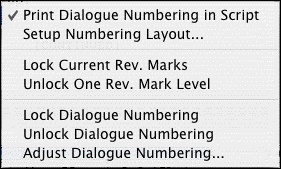
Shows you options for Animation Production Features.
• |
Print Numbering in Script—If checked, Displays and Prints the dialogue speech numbering in the script (as well as in the Animation Recording Script report). A checkmark displays next to Print Numbering in Script. To turn the display of Numbering off, click on it again. |
• |
Setup Numbering Layout—This setup window allows you to control the way Animation Dialogue is printed. |
• |
Lock Current Rev. Marks—Locks the Current Revision Marks and increases the Revision Mark Level. |
• |
Unlock One Rev. Mark Level—Removes the last Locked Revision Marks and decreases the Revision Mark Level. |
• |
Lock Dialogue Numbering—Locks the Dialogue Numbering so that any new speeches are added as A- Numbers. If Dialogue is already Locked, it will Multi-Lock the numbering so new speeches are added as AA- Numbers. |
• |
Unlock Dialogue Numbering—Decreases Dialogue Locking from AA- Numbering to A- Numbering or from A- Numbering to Unlocked Dialogue Numbering. |
• |
Adjust Dialogue Numbering—Adjusts (overrides) the numbering of the Dialogue speech that the cursor is currently in. |